

SMS Configuration
WHMCS Notify Extended
SMS Configuration
 February 18, 2018 5:50 AM by Tom Whiting
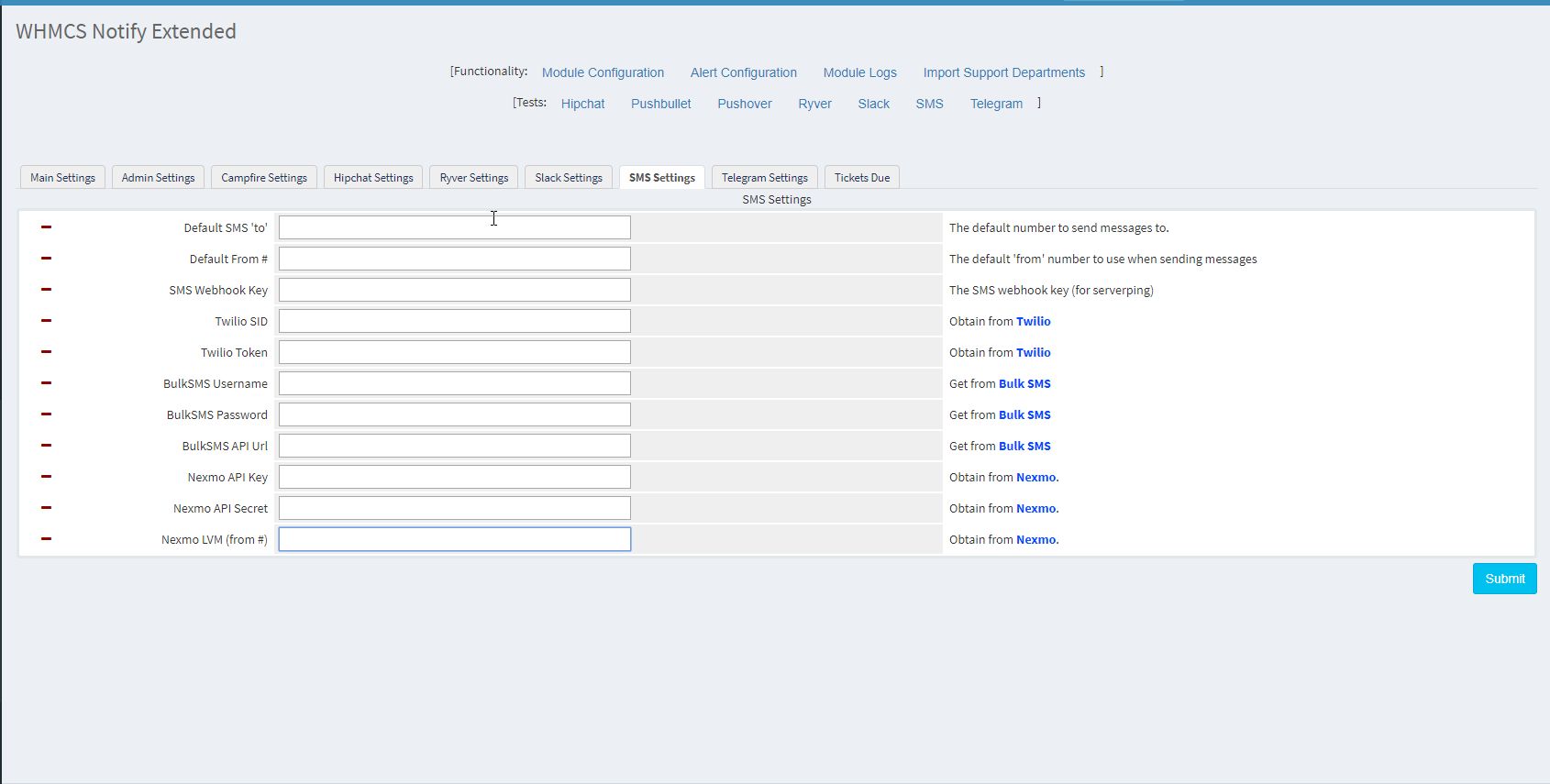 SMS is another one of those 'staples' of today's culture. You just want to have this enabled. We've provided three separate carriers from which you can choose . They are :
Twilio (our primary), bulksms and Nexmo .
Here's how to set these up for your use:
SMS is another one of those 'staples' of today's culture. You just want to have this enabled. We've provided three separate carriers from which you can choose . They are :
Twilio (our primary), bulksms and Nexmo .
Here's how to set these up for your use:
- Default SMS to This is kind of a 'forwarder', the default address you want all messages sent to. If you're using Twilio (highly recommended), see how you can enable a forwarder for your SMS messages here
- Default From # This is the phone # that your message will be sent from (if allowed, per your system)
- SMS Webhook Key Like other webhook keys right now, rather useless, but it will be expanded on in the future
- Twilio SID You can get this from Twilio directly
- Twilio Token Again, you can get this from Twilio directly
- BulkSMS Username
- BulkSMS Password
- BulkSMS API URL
- Nexmo API Key (get from Nexmo directly)
- Nexmo API Secret (again, you can get this from them directly)
- Nexmo LVM (from #), you can get this from Nexmo
Updated on February 18, 2018 5:50 AM
Did you find this useful?
0 people have found this useful.
Search
Projects
WHMCS Cron Notifications Extended
4
WHMCS Notify Extended
6
WHMCS Support Extended
4
WHMCS User and IP Control
3
WHMCS User Email Validation
4
Tags
Added 3
Admin 2
Alert 3
Alerts 1
Amount 1
Another 1
Appropriate 1
Based 2
Better 1
Bulksms 1
Campfire 1
Cannot 1
Cases 1
Changelog 1
Chat 2
Check 1
Click 2
Client 2
Clients 1
Cron 1
Crons 1
Default 3
Department 1
Didn 1
Directly 1
Directory 1
Disable 1
Doesn 1
Download 2
Each 4
Email 1
Enable 1
Enabled 2
English 1
Expanded 1
Extended 4
Fixes 1
Forwarder 1
Functionality 1
Group 1
Heart 1
Help 1
Here 4
Huge 1
Information 1
Initial 1
Install 1
Invalid 1
Just 1
Lang 1
License 2
Like 4
List 1
Logging 1
Long 1
Make 1
Mass 1
Message 2
Minutes 1
Misc 3
Moved 1
Much 1
Name 1
Need 3
Needed 1
Nexmo 1
Nickname 1
Notes 1
Notification 3
Notifications 3
Notify 3
Obtain 2
Official 1
Overrides 1
Password 1
Payment 1
Please 1
Portion 1
Product 2
Provided 1
Pushalot 1
Pushbullet 2
Pushover 2
Quick 1
Receiving 1
Release 1
Reminder 1
Rename 1
Room 2
Ryver 2
Screen 1
Select 1
Send 1
Sent 1
Services 1
Setup 2
Should 1
Showing 1
Simply 1
Slack 1
Some 1
Something 1
Soul 1
Specific 2
Stable 1
Staff 1
Support 3
Sure 1
System 1
Team 1
Telegram 4
Testing 1
Their 1
Then 3
There 1
These 1
They 1
Through 2
Token 2
Troubleshooting 1
Twilio 1
Update 1
Updates 1
Upload 1
Used 1
User 2
Version 4
Want 3
Webhook 1
Were 1
What 2
When 1
Where 1