

Nag Configuration
WHMCS Notify Extended
Nag Configuration
 February 18, 2018 8:23 AM by Tom Whiting
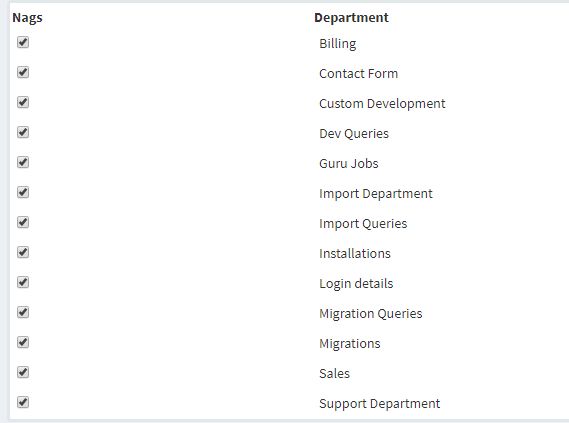 This is the default screen (or something like it) when you click on the 'Alert Configuration' link in your WHMCS Notify Extended addon.
By default, all departments will be unchecked, and will not send 'nag' alerts. It's up to you to check the ones that you feel are important enough to be 'nagged' about on a continual basis.
It should be noted that there is no 'submit' button, and none is needed. As you check each of these, the department will be automatically set to nag as needed
This is the default screen (or something like it) when you click on the 'Alert Configuration' link in your WHMCS Notify Extended addon.
By default, all departments will be unchecked, and will not send 'nag' alerts. It's up to you to check the ones that you feel are important enough to be 'nagged' about on a continual basis.
It should be noted that there is no 'submit' button, and none is needed. As you check each of these, the department will be automatically set to nag as needed
Updated on February 18, 2018 8:23 AM
Did you find this useful?
0 people have found this useful.
Search
Projects
WHMCS Cron Notifications Extended
4
WHMCS Notify Extended
6
WHMCS Support Extended
4
WHMCS User and IP Control
3
WHMCS User Email Validation
4
Tags
Added 3
Admin 2
Alert 3
Alerts 1
Amount 1
Another 1
Appropriate 1
Based 2
Better 1
Bulksms 1
Campfire 1
Cannot 1
Cases 1
Changelog 1
Chat 2
Check 1
Click 2
Client 2
Clients 1
Cron 1
Crons 1
Default 3
Department 1
Didn 1
Directly 1
Directory 1
Disable 1
Doesn 1
Download 2
Each 4
Email 1
Enable 1
Enabled 2
English 1
Expanded 1
Extended 4
Fixes 1
Forwarder 1
Functionality 1
Group 1
Heart 1
Help 1
Here 4
Huge 1
Information 1
Initial 1
Install 1
Invalid 1
Just 1
Lang 1
License 2
Like 4
List 1
Logging 1
Long 1
Make 1
Mass 1
Message 2
Minutes 1
Misc 3
Moved 1
Much 1
Name 1
Need 3
Needed 1
Nexmo 1
Nickname 1
Notes 1
Notification 3
Notifications 3
Notify 3
Obtain 2
Official 1
Overrides 1
Password 1
Payment 1
Please 1
Portion 1
Product 2
Provided 1
Pushalot 1
Pushbullet 2
Pushover 2
Quick 1
Receiving 1
Release 1
Reminder 1
Rename 1
Room 2
Ryver 2
Screen 1
Select 1
Send 1
Sent 1
Services 1
Setup 2
Should 1
Showing 1
Simply 1
Slack 1
Some 1
Something 1
Soul 1
Specific 2
Stable 1
Staff 1
Support 3
Sure 1
System 1
Team 1
Telegram 4
Testing 1
Their 1
Then 3
There 1
These 1
They 1
Through 2
Token 2
Troubleshooting 1
Twilio 1
Update 1
Updates 1
Upload 1
Used 1
User 2
Version 4
Want 3
Webhook 1
Were 1
What 2
When 1
Where 1