

Main Configuration
WHMCS Notify Extended
Main Configuration
 February 18, 2018 5:18 AM by Tom Whiting
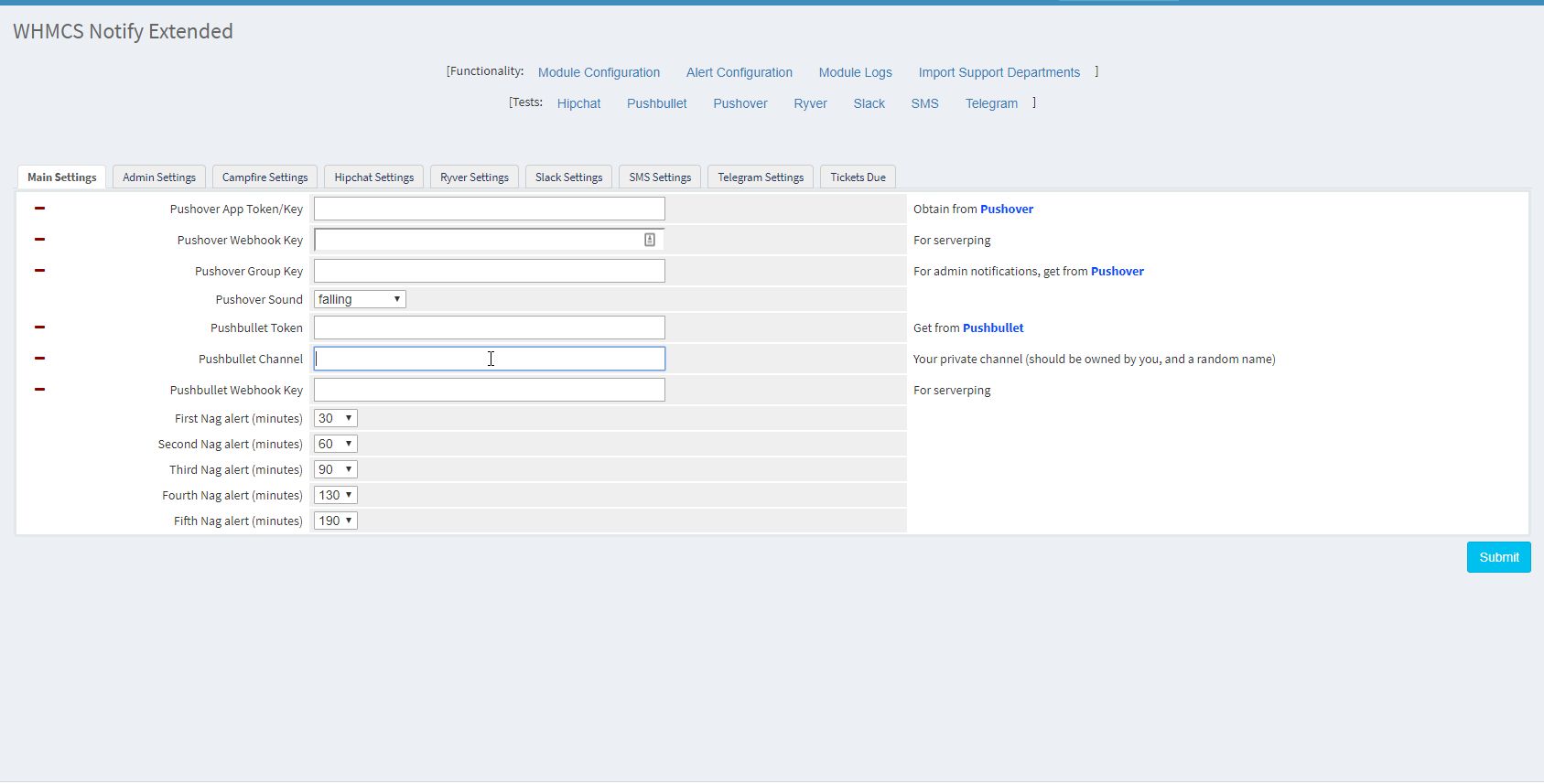 The main module configuration for WHMCS Notify Extended is pretty straightforward. A bit of explanation here
- Pushover App Token/Key This is the key that you will use to login to Pushover with. It's your individual API / APP key, You can obtain this from pushover
- Pushover Webhook Key This is a webhook key. Originally intended to be used exclusively for serverping, this will be modified and used more later on
- Pushover Group Key This is a group that your admin should be all enrolled in. This is the default 'alert' group. You can obtain this from pushover
- Pushover Sound Pushover allows you to customize the alerts coming out, choose a custom sound for your pushover alert
- Pushbullet Token Your private Pushbullet token. You can get this here
- Pushbullet Channel A private pushbullet channel that you should have created. You can do so here . It's best to create a channel that's as strong as a good password and keep this handy. Otherwise, privacy is not guaranteed.
- Pushbullet Webhook Key Much like the Pushover Webhook Key, not terribly useful (yet).
- Nag Alerts There are up to five nag alerts that can be configured. These are setup so that you're reminded (or nagged) after X period of time. The way this works is simple. If you setup the first nag alert for 20 minutes, in 21 minutes, you'll receive a nag notification If you setup the second alert for 60 minutes, 60 minutes from the time the first alert goes off, you'll receive another notification If you setup the third alert for 90 minutes, then 90 minutes from the time the second alert goes off, you'll receive another notification and on, and on , and on Make sure to read the cron portion of 'setup' for more information on this feature
Updated on February 18, 2018 5:18 AM
Did you find this useful?
0 people have found this useful.
Search
Projects
WHMCS Cron Notifications Extended
4
WHMCS Notify Extended
6
WHMCS Support Extended
4
WHMCS User and IP Control
3
WHMCS User Email Validation
4
Tags
Added 3
Admin 2
Alert 3
Alerts 1
Amount 1
Another 1
Appropriate 1
Based 2
Better 1
Bulksms 1
Campfire 1
Cannot 1
Cases 1
Changelog 1
Chat 2
Check 1
Click 2
Client 2
Clients 1
Cron 1
Crons 1
Default 3
Department 1
Didn 1
Directly 1
Directory 1
Disable 1
Doesn 1
Download 2
Each 4
Email 1
Enable 1
Enabled 2
English 1
Expanded 1
Extended 4
Fixes 1
Forwarder 1
Functionality 1
Group 1
Heart 1
Help 1
Here 4
Huge 1
Information 1
Initial 1
Install 1
Invalid 1
Just 1
Lang 1
License 2
Like 4
List 1
Logging 1
Long 1
Make 1
Mass 1
Message 2
Minutes 1
Misc 3
Moved 1
Much 1
Name 1
Need 3
Needed 1
Nexmo 1
Nickname 1
Notes 1
Notification 3
Notifications 3
Notify 3
Obtain 2
Official 1
Overrides 1
Password 1
Payment 1
Please 1
Portion 1
Product 2
Provided 1
Pushalot 1
Pushbullet 2
Pushover 2
Quick 1
Receiving 1
Release 1
Reminder 1
Rename 1
Room 2
Ryver 2
Screen 1
Select 1
Send 1
Sent 1
Services 1
Setup 2
Should 1
Showing 1
Simply 1
Slack 1
Some 1
Something 1
Soul 1
Specific 2
Stable 1
Staff 1
Support 3
Sure 1
System 1
Team 1
Telegram 4
Testing 1
Their 1
Then 3
There 1
These 1
They 1
Through 2
Token 2
Troubleshooting 1
Twilio 1
Update 1
Updates 1
Upload 1
Used 1
User 2
Version 4
Want 3
Webhook 1
Were 1
What 2
When 1
Where 1