

Other Services
WHMCS Notify Extended
Other Services
 February 18, 2018 8:24 AM by Tom Whiting
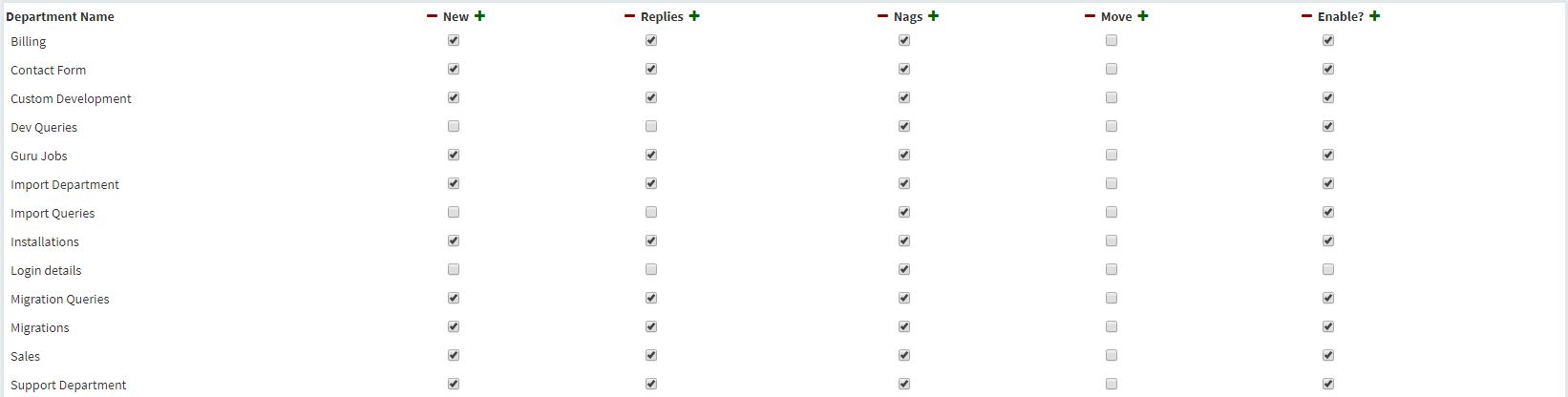 This is your basic alert configuration for your non room based services. Because these services don't have 'room' based configurations, you simply need to tick on whether or not you want specific items sent as alerts.
As with the room based services, to enable or disable all departments, simply click on the + or - buttons. To disable all notifications for a specific department, check the 'Enabled" row for that department and no notifications will be sent via this method
This is your basic alert configuration for your non room based services. Because these services don't have 'room' based configurations, you simply need to tick on whether or not you want specific items sent as alerts.
As with the room based services, to enable or disable all departments, simply click on the + or - buttons. To disable all notifications for a specific department, check the 'Enabled" row for that department and no notifications will be sent via this method
Updated on February 18, 2018 8:24 AM
Did you find this useful?
0 people have found this useful.
Search
Projects
WHMCS Cron Notifications Extended
4
WHMCS Notify Extended
6
WHMCS Support Extended
4
WHMCS User and IP Control
3
WHMCS User Email Validation
4
Tags
Added 3
Admin 2
Alert 3
Alerts 1
Amount 1
Another 1
Appropriate 1
Based 2
Better 1
Bulksms 1
Campfire 1
Cannot 1
Cases 1
Changelog 1
Chat 2
Check 1
Click 2
Client 2
Clients 1
Cron 1
Crons 1
Default 3
Department 1
Didn 1
Directly 1
Directory 1
Disable 1
Doesn 1
Download 2
Each 4
Email 1
Enable 1
Enabled 2
English 1
Expanded 1
Extended 4
Fixes 1
Forwarder 1
Functionality 1
Group 1
Heart 1
Help 1
Here 4
Huge 1
Information 1
Initial 1
Install 1
Invalid 1
Just 1
Lang 1
License 2
Like 4
List 1
Logging 1
Long 1
Make 1
Mass 1
Message 2
Minutes 1
Misc 3
Moved 1
Much 1
Name 1
Need 3
Needed 1
Nexmo 1
Nickname 1
Notes 1
Notification 3
Notifications 3
Notify 3
Obtain 2
Official 1
Overrides 1
Password 1
Payment 1
Please 1
Portion 1
Product 2
Provided 1
Pushalot 1
Pushbullet 2
Pushover 2
Quick 1
Receiving 1
Release 1
Reminder 1
Rename 1
Room 2
Ryver 2
Screen 1
Select 1
Send 1
Sent 1
Services 1
Setup 2
Should 1
Showing 1
Simply 1
Slack 1
Some 1
Something 1
Soul 1
Specific 2
Stable 1
Staff 1
Support 3
Sure 1
System 1
Team 1
Telegram 4
Testing 1
Their 1
Then 3
There 1
These 1
They 1
Through 2
Token 2
Troubleshooting 1
Twilio 1
Update 1
Updates 1
Upload 1
Used 1
User 2
Version 4
Want 3
Webhook 1
Were 1
What 2
When 1
Where 1