

Room based services
WHMCS Notify Extended
Room based services
 February 18, 2018 8:24 AM by Tom Whiting
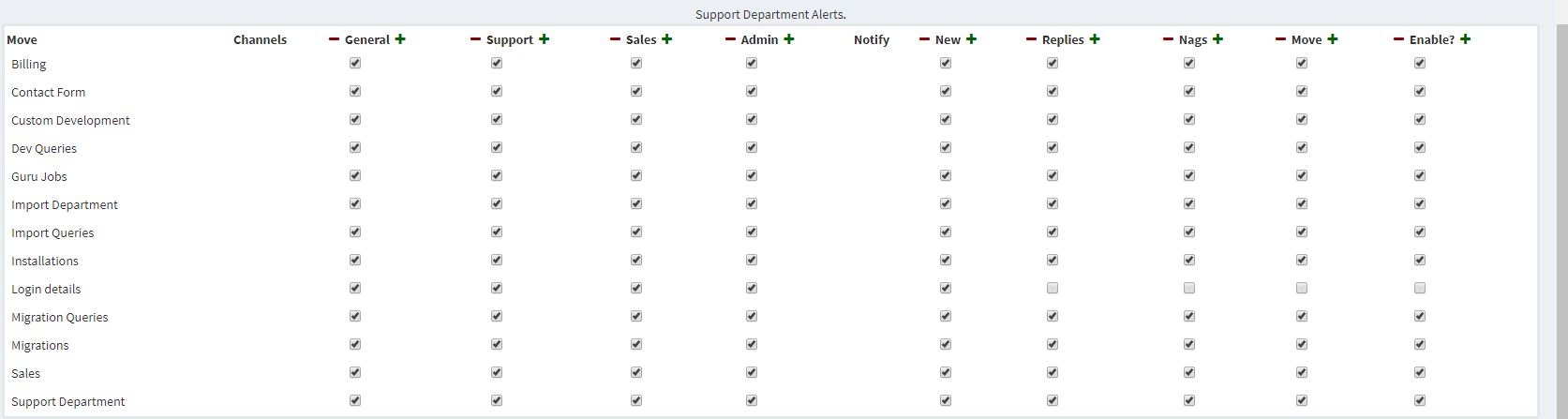 This is your 'room based' service alert page. This will apply to any chat based services, such as Ryver, Hipchat, Campfire, Slack, and others that may be added.
Each department (the leftmost pane) will have a variety of 'channels' that it may have alerts sent to. You can configure this to go to one, or all channels if you like
Additionally, each department will have specific notify requirements. You can tell the system to send alerts based on nags, new tickets, moves and ticket replies
At the far most right, you'll see an "Enabled" check. If this is not checked, then the department will not alert. This is a quick way of turning off all alerts
As most won't have but one single chat based method (hipchat, etc), this part of the configuration will carry across to all chat based methods. If it's enabled in one, it'll be enabled across the board for any chat based method you have.
As with the nag configuration, you don't need to save anything, or click any buttons. Simply checking something will indeed save the data.
For a quick way to enable, or disable options per row, use the + and - buttons at the top of the row.
For a quick way to enable or disable alerts for a single department, tick the 'enable' row in each department
This is your 'room based' service alert page. This will apply to any chat based services, such as Ryver, Hipchat, Campfire, Slack, and others that may be added.
Each department (the leftmost pane) will have a variety of 'channels' that it may have alerts sent to. You can configure this to go to one, or all channels if you like
Additionally, each department will have specific notify requirements. You can tell the system to send alerts based on nags, new tickets, moves and ticket replies
At the far most right, you'll see an "Enabled" check. If this is not checked, then the department will not alert. This is a quick way of turning off all alerts
As most won't have but one single chat based method (hipchat, etc), this part of the configuration will carry across to all chat based methods. If it's enabled in one, it'll be enabled across the board for any chat based method you have.
As with the nag configuration, you don't need to save anything, or click any buttons. Simply checking something will indeed save the data.
For a quick way to enable, or disable options per row, use the + and - buttons at the top of the row.
For a quick way to enable or disable alerts for a single department, tick the 'enable' row in each department
Updated on February 18, 2018 8:24 AM
Did you find this useful?
0 people have found this useful.
Search
Projects
WHMCS Cron Notifications Extended
4
WHMCS Notify Extended
6
WHMCS Support Extended
4
WHMCS User and IP Control
3
WHMCS User Email Validation
4
Tags
Added 3
Admin 2
Alert 3
Alerts 1
Amount 1
Another 1
Appropriate 1
Based 2
Better 1
Bulksms 1
Campfire 1
Cannot 1
Cases 1
Changelog 1
Chat 2
Check 1
Click 2
Client 2
Clients 1
Cron 1
Crons 1
Default 3
Department 1
Didn 1
Directly 1
Directory 1
Disable 1
Doesn 1
Download 2
Each 4
Email 1
Enable 1
Enabled 2
English 1
Expanded 1
Extended 4
Fixes 1
Forwarder 1
Functionality 1
Group 1
Heart 1
Help 1
Here 4
Huge 1
Information 1
Initial 1
Install 1
Invalid 1
Just 1
Lang 1
License 2
Like 4
List 1
Logging 1
Long 1
Make 1
Mass 1
Message 2
Minutes 1
Misc 3
Moved 1
Much 1
Name 1
Need 3
Needed 1
Nexmo 1
Nickname 1
Notes 1
Notification 3
Notifications 3
Notify 3
Obtain 2
Official 1
Overrides 1
Password 1
Payment 1
Please 1
Portion 1
Product 2
Provided 1
Pushalot 1
Pushbullet 2
Pushover 2
Quick 1
Receiving 1
Release 1
Reminder 1
Rename 1
Room 2
Ryver 2
Screen 1
Select 1
Send 1
Sent 1
Services 1
Setup 2
Should 1
Showing 1
Simply 1
Slack 1
Some 1
Something 1
Soul 1
Specific 2
Stable 1
Staff 1
Support 3
Sure 1
System 1
Team 1
Telegram 4
Testing 1
Their 1
Then 3
There 1
These 1
They 1
Through 2
Token 2
Troubleshooting 1
Twilio 1
Update 1
Updates 1
Upload 1
Used 1
User 2
Version 4
Want 3
Webhook 1
Were 1
What 2
When 1
Where 1