

Slack Configuration
WHMCS Notify Extended
Slack Configuration
 February 18, 2018 5:50 AM by Tom Whiting
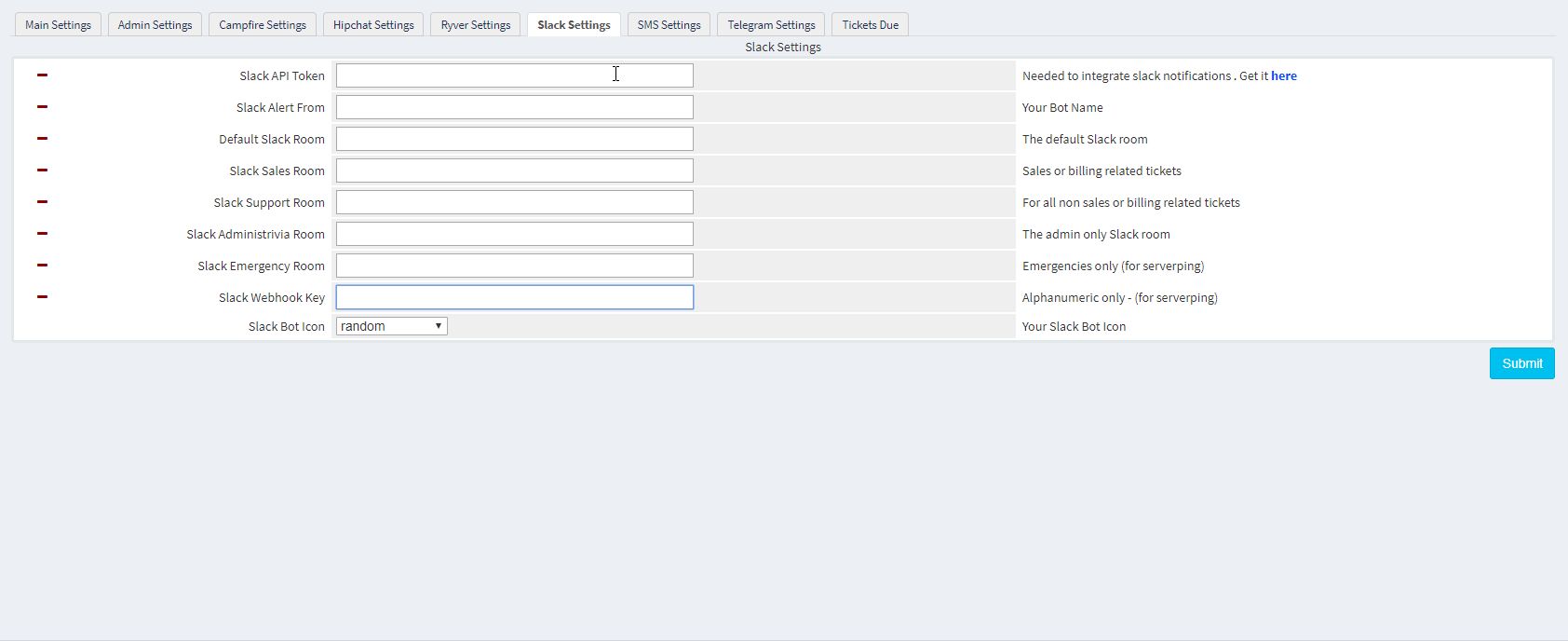 Slack is, without a doubt, the boss of this type of communication. We'd be remiss if we didn't add slack in, so it's been in from the beginning. Here's what you need to know in order to get slack up and running on WHMCS Notify Extended
- Slack API Token You need an API token to get in and take care of business with slack. You can obtain that from here .
- Slack Alert From This is a customized 'who' for your slack alerts. Set it to whatever you'd like, just make sure it's something you remember
- Slack default/sales/support/admin/emergency rooms These are just the room names used. Unlike with HipChat, capitalization does not matter
- Slack Webhook Key Like with the others, this isn't terribly useful at this point. We'll have more use for this at a later date
- Slack Bot Icon There are a number to choose from. Random is the default setting, because, well, it's fun to see what slack decides to use :) . Feel free to choose your own
Updated on February 18, 2018 5:50 AM
Did you find this useful?
0 people have found this useful.
Search
Projects
WHMCS Cron Notifications Extended
4
WHMCS Notify Extended
6
WHMCS Support Extended
4
WHMCS User and IP Control
3
WHMCS User Email Validation
4
Tags
Added 3
Admin 2
Alert 3
Alerts 1
Amount 1
Another 1
Appropriate 1
Based 2
Better 1
Bulksms 1
Campfire 1
Cannot 1
Cases 1
Changelog 1
Chat 2
Check 1
Click 2
Client 2
Clients 1
Cron 1
Crons 1
Default 3
Department 1
Didn 1
Directly 1
Directory 1
Disable 1
Doesn 1
Download 2
Each 4
Email 1
Enable 1
Enabled 2
English 1
Expanded 1
Extended 4
Fixes 1
Forwarder 1
Functionality 1
Group 1
Heart 1
Help 1
Here 4
Huge 1
Information 1
Initial 1
Install 1
Invalid 1
Just 1
Lang 1
License 2
Like 4
List 1
Logging 1
Long 1
Make 1
Mass 1
Message 2
Minutes 1
Misc 3
Moved 1
Much 1
Name 1
Need 3
Needed 1
Nexmo 1
Nickname 1
Notes 1
Notification 3
Notifications 3
Notify 3
Obtain 2
Official 1
Overrides 1
Password 1
Payment 1
Please 1
Portion 1
Product 2
Provided 1
Pushalot 1
Pushbullet 2
Pushover 2
Quick 1
Receiving 1
Release 1
Reminder 1
Rename 1
Room 2
Ryver 2
Screen 1
Select 1
Send 1
Sent 1
Services 1
Setup 2
Should 1
Showing 1
Simply 1
Slack 1
Some 1
Something 1
Soul 1
Specific 2
Stable 1
Staff 1
Support 3
Sure 1
System 1
Team 1
Telegram 4
Testing 1
Their 1
Then 3
There 1
These 1
They 1
Through 2
Token 2
Troubleshooting 1
Twilio 1
Update 1
Updates 1
Upload 1
Used 1
User 2
Version 4
Want 3
Webhook 1
Were 1
What 2
When 1
Where 1