

Admin Configuration
WHMCS Notify Extended
Admin Configuration
 February 18, 2018 5:50 AM by Tom Whiting
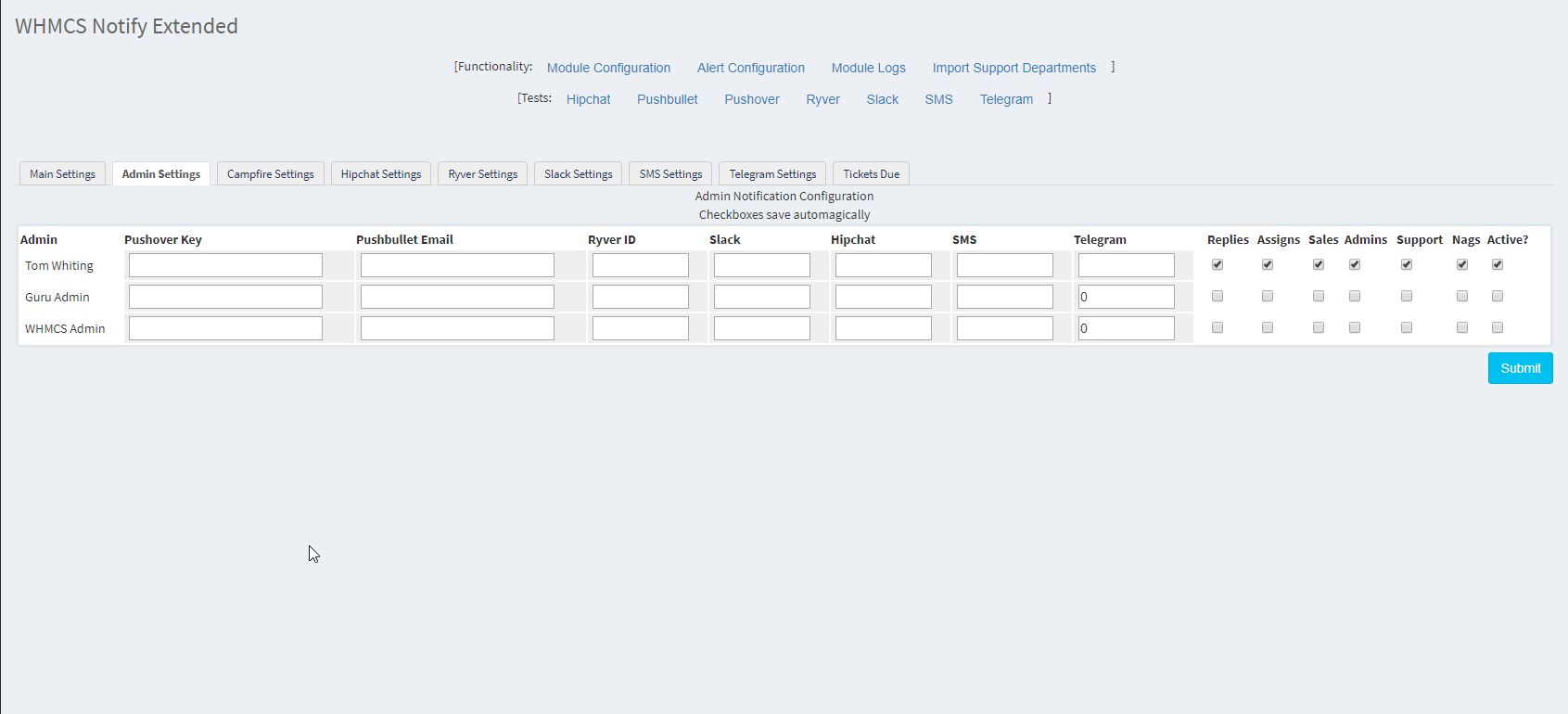 In WHMCS Notify Extended, each administrator can have their own individual alert channels setup. So, if a ticket assigned to them is responded to, they will be notified. if they're a member of your sales team, and sales alerts are configured for them, they will be notified, and so on and so forth. A brief description of each field
- Pushover Key This is the admin's unique Pushover key. This can be obtained from Pushover directly
- Pushbullet Email This is the email address by which they're subscribed to pushbullet
- Ryver ID This is their specific Ryver ID. Note: This should not be confused with their Ryver Nickname. See the Ryver documentation for obtaining this information
- Slack This is the user's Slack nickname
- Hipchat This is the user's Hipchat nickname
- SMS This is the user's SMS number
- Telegram This is the user's Telegram ID. Again, this should not be confused with their Telegram nickname. See the Telegram documentation for obtaining this information
Updated on February 18, 2018 5:50 AM
Did you find this useful?
0 people have found this useful.
Search
Projects
WHMCS Cron Notifications Extended
4
WHMCS Notify Extended
6
WHMCS Support Extended
4
WHMCS User and IP Control
3
WHMCS User Email Validation
4
Tags
Added 3
Admin 2
Alert 3
Alerts 1
Amount 1
Another 1
Appropriate 1
Based 2
Better 1
Bulksms 1
Campfire 1
Cannot 1
Cases 1
Changelog 1
Chat 2
Check 1
Click 2
Client 2
Clients 1
Cron 1
Crons 1
Default 3
Department 1
Didn 1
Directly 1
Directory 1
Disable 1
Doesn 1
Download 2
Each 4
Email 1
Enable 1
Enabled 2
English 1
Expanded 1
Extended 4
Fixes 1
Forwarder 1
Functionality 1
Group 1
Heart 1
Help 1
Here 4
Huge 1
Information 1
Initial 1
Install 1
Invalid 1
Just 1
Lang 1
License 2
Like 4
List 1
Logging 1
Long 1
Make 1
Mass 1
Message 2
Minutes 1
Misc 3
Moved 1
Much 1
Name 1
Need 3
Needed 1
Nexmo 1
Nickname 1
Notes 1
Notification 3
Notifications 3
Notify 3
Obtain 2
Official 1
Overrides 1
Password 1
Payment 1
Please 1
Portion 1
Product 2
Provided 1
Pushalot 1
Pushbullet 2
Pushover 2
Quick 1
Receiving 1
Release 1
Reminder 1
Rename 1
Room 2
Ryver 2
Screen 1
Select 1
Send 1
Sent 1
Services 1
Setup 2
Should 1
Showing 1
Simply 1
Slack 1
Some 1
Something 1
Soul 1
Specific 2
Stable 1
Staff 1
Support 3
Sure 1
System 1
Team 1
Telegram 4
Testing 1
Their 1
Then 3
There 1
These 1
They 1
Through 2
Token 2
Troubleshooting 1
Twilio 1
Update 1
Updates 1
Upload 1
Used 1
User 2
Version 4
Want 3
Webhook 1
Were 1
What 2
When 1
Where 1